Kirkland, WA · Instruction & learning experience design

I design learning people can actually do.

Sequenced journeys, interactive courses, job aids, and facilitator guides — built with clear outcomes, then revised from how learners actually use them.

I am a design-first educator. For three years I have designed skill-sequenced music curriculum across six grade levels and facilitated live sessions for about 450 students in Lake Washington School District. Alongside that work I write and ship digital learning under Trailpost — interactive modules, practice, and teacher-facing guides that run in a browser with no special install.

Before education I spent nine years at Microsoft / Xbox as a Software Test Engineer and Area Owner. I still treat content like a product: standards, SME partnership, and a clean handoff.

Selected work

Courses, practice, and a learning game

Two interactive LMS courses lead the portfolio. Morse Desk and Rewind are playable practice environments on this site. Edumon is a curriculum RPG in the browser.

01 · Interactive LMS courses

02 · Practice environments

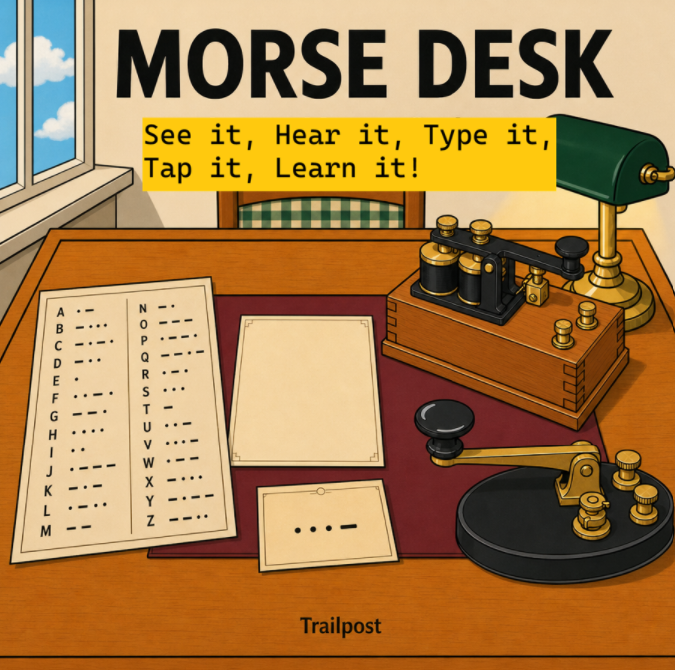
Morse Desk product art: a wooden telegraph desk with a Morse chart, blank paper, a sounder, and a telegraph key.

Chromebook-ready · Trailpost

Morse Desk

See it, hear it, type it, tap it. Learners read Morse, send on a telegraph key, and listen on a sounder — offline, in the browser, with no account. Rank climbs as accuracy holds.
  • Multi-modal practice
  • No install
  • Teacher walkthrough
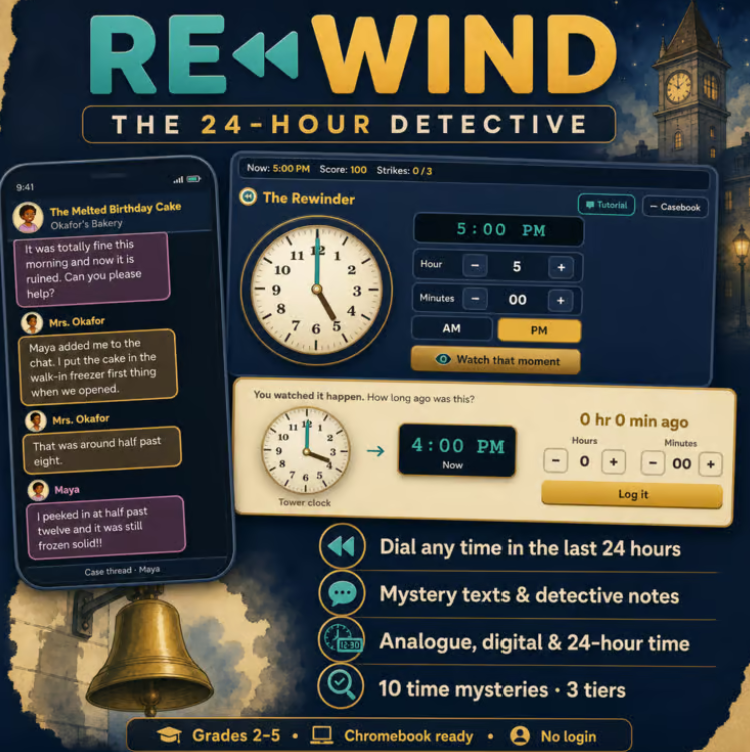
Rewind: The 24-Hour Detective product art, showing a clock rewinder, mystery texts, and analogue, digital, and 24-hour time practice.

Grades 2–5 · Trailpost

Rewind: The 24-Hour Detective

Dial any time in the last 24 hours, read mystery texts, and log what happened when. Learners practice analogue, digital, and 24-hour time across ten mysteries — Chromebook-ready, no login.

  • Elapsed time
  • Analogue & digital
  • 10 mysteries

03 · Educational game

Browser RPG · edumongame.com

Edumon: The Archivist’s Journey

An educational role-playing game where studying is how you advance. Players explore a story world, keep a field journal, and study to catch and train Edumon — built on thousands of curriculum questions, with dedicated support for multilingual learners.

  • Learning as the mechanic
  • Classroom keys, no student accounts
  • Runs in the browser

Also in the studio

Curriculum, products, and live rooms

Lake Washington School District

Skill-sequenced music pathways across six grades, with defined outcomes, checkpoints, and the job aids other teachers use so delivery stays aligned. Live facilitation for about 450 learners.

Trailpost

30+ educational products: interactive modules, sequenced practice, and facilitator guides for non-technical teachers. Browser-based, Chromebook-ready, no special install.

teacherspayteachers.com/store/trailpost

How I work

Outcomes, then practice, then a quality bar.

  1. Name what they should be able to do

    Audience, context, and a performance that can be checked — not a pile of topics.

  2. Put the hard part on the screen

    Model, try, branch, get feedback. Knowledge checks for practice; scored quizzes when the mark has to count.

  3. Ship something a facilitator can run

    Themes, alt text, captions, transcripts, and packages that land in an LMS. Then revise from what people do with it.

Course authoring

What I can build in a course studio

I author full interactive eLearning: Rise-style scroll lessons and Storyline-style slides, including timeline animation, triggers, variables, and LMS packages. If a modern course studio can do it, I can do it.

Structure and navigation

  • Scroll lessons and slide lessons, including a free-form canvas
  • Linear paths, branching, and learner-choice navigation
  • Gating, required lessons, and lock-until-previous sequences
  • Story / map view of the learner path
  • Completion rules and printable certificates
  • Course, lesson, and block templates; reusable content library

Slide interaction

  • Timeline animation synced to audio and video
  • Motion paths; objects that appear, move, or play on a clock
  • Triggers: click, hover, timeline, cue, drop, keypress, media complete, variable change, state change
  • Actions: show/hide, jump, layers, play/pause/seek media, change state, enable/disable
  • If / else conditions (AND / OR)
  • Course variables (text, number, true/false) and text-entry that writes to a variable
  • Layers, object states, drag-and-drop, and drop targets

On-screen content

  • Text, statements, quotes, lists, tables, and code samples
  • Accordions, tabs, flip cards, process steps, and checklists
  • Buttons that link, jump, download, or reveal
  • Images, galleries, carousels, and labeled graphics with hotspots
  • Audio and video (local files or YouTube) with captions and transcripts
  • Embeds and downloadable attachments
  • Branching conversation scenarios

Practice and assessment

  • Ungraded knowledge checks vs. scored quiz lessons
  • Multiple choice, multiple select, true/false, matching, ordering
  • Fill-in-blank, numeric (with tolerance), hotspot, word bank
  • Drag-to-match, drag-to-sort, Likert, survey, and long answer
  • Sorting into categories; practice matching
  • Question banks with tags; pools with random draw
  • Shuffle, attempt limits, pass marks, weighting, partial credit
  • Feedback timing (immediate, after submit, after completion)
  • Remediation when a score falls below a threshold

Media, access, and look

  • Alt text, captions, and transcripts as a default, not a pass at the end
  • Accessibility checks for missing alt/captions and contrast
  • High-contrast and other theme presets; custom fonts, colors, and density
  • Cover art, accent palettes, and sidebar or compact navigation
  • Desktop, tablet, and phone preview
  • Left-to-right and right-to-left direction

Publish and tracking

  • Web zip and single HTML for Drive, email, or a school site
  • SCORM 1.2 and SCORM 2004 4th Edition
  • xAPI, cmi5, and AICC packages
  • Assign learners, read completion and scores, export reports
  • Responsive player; certificates of completion

Experience

Teaching, products, and a quality background

2023–present

Music Educator and Curriculum Designer

Lake Washington School District, Kirkland, WA

  • Design and maintain curricula across six grade levels, with defined outcomes, checkpoints, and progression paths
  • Facilitate live instruction for about 450 students; adjust pacing from observed engagement
  • Train collaborating teachers; write job aids and facilitation-ready guides

2026–present

Instructional Content Designer

Trailpost (independent educational software and resources), Kirkland, WA

  • Own 30+ educational products end to end: goals, writing, interaction, UI, and release — including Morse Desk, Rewind, and Edumon
  • Build self-paced digital learning with knowledge checks, learner choice, and branching
  • Write facilitator guides for non-technical audiences; iterate from feedback

2007–2016

Software Test Engineer / Area Owner

Microsoft / Xbox, Redmond, WA

  • Area Owner for content quality, test case authoring, and documentation; partnered with SMEs across teams
  • Designed and executed data-driven quality assessments for titles including Gears of War, Forza, and Halo
  • Playtested for usability and delivered specific, actionable feedback under production deadlines

2017–2023

Behavior Technician and Early Childhood Educator

Greater Seattle Area, WA

  • Differentiated support for K–5 learners with complex needs; tracked progress with cross-functional teams
  • Adapted communication for children, families, and specialists

Education

Bachelor of Arts in Education, Interdisciplinary Child Development, Western Washington University

K–5 Teaching Certification, Washington State; endorsed in Music and Visual Arts

Kodály methodology: sequential design, skill progression, differentiated instruction

Contact

Let’s talk about a role.

Based in Kirkland, Pacific Time. Legally authorized to work in the United States; no visa sponsorship required. Open to remote and Greater Seattle hybrid.